
Artwork Setup Guide
We offer detailed information to help you find out if your artwork will be suitable for printing. Or to instruct your designer on how to setup their artwork. If you need any help with the design of your artwork please note we do offer a graphic design service.
All files need to be setup CMYK.
Sending your artwork
Due to restrictions by Internet providers, large files may not reach us if attached to an email. Please either request a read receipt or give us a call to check that we have received your artwork.
- Send us artwork using WeTransfer (recommended)
- Download PDF instructions
File setup guidelines
Supported Software
|
Adobe’s Indesign, Illustrator & Photoshop and Quark Xpress. These are our preferred packages, as well as PDFs that are PDF-X compliant., as well as PDFs that are PDF-X compliant.
Please see our Software & Artwork Types sheet, for an overview of possible file types. Transference Fees Submitting artwork in unsupported packages like Microsoft Word, PowerPoint, or Publisher will result in a transfer fee, billed at our current hourly rate. |
Formats |
Where possible, please use Adobe InDesign or Quark Xpress to build your page layouts. Always ‘link’ elements between your layout package and your support files. Never embed them.If you embed supporting files, we will be unable to edit them should any issues arise. |
Size |
Set up your files at full size whenever possible or to a true proportion, like half or quarter scale. Adobe InDesign can create pages up to 5.4m, but QuarkXPress is limited to 1.2m. Include a 3mm bleed on all edges at 100%. We digitally cut all prints, and this bleed ensures an accurate finish. |
Fonts |
Please supply all fonts when using Adobe InDesign or Quark Xpress. The job collection functions in Adobe InDesign or Quark Xpress will collect everything we need. Where possible, always try to convert ‘fonts to curves’ in support files e.g. in Adobe Illustrator. Never use the ‘stylising’ tools in Quark Xpress. The changes these tools make are not supported in printer RIPs. And will be ignored, converting your text back to the plain version of the font. |
Colour |
Please advise Access if you wish to match a specific Pantone colour. Access will then endeavour to match to the colour as closely as possible. Sadly, it may well be impossible to match to certain Pantone colours. Due to the limitations of CMYK printing and the make up of Pantone inks. Avoid using percentages/tints of Pantone colours. Try to choose a separate Pantone colour instead. For best colour matching try to create your Pantones as Pantone Solid Coated colours. |
Photographic Elements |
When creating image elements please set up at a minimum of 75dpi at 100% for general images. If the image contains fine detail or text then this resolution should increase to 150+ dpi at 100%. As any pixelation is much more noticeable around the edges of text.Please convert all bitmap files from Photoshop and other programs to CMYK and save them as uncompressed TIFF or EPS files. Avoid using JPEG compression, as it will reduce image quality. For more information, please refer to our Bitmaps & Vectors sheet. |
Artwork Supply |
For QuarkXPress files, use ‘Collect for Output’ to gather fonts; for InDesign, use ‘Package’. Please supply all elements in their native format. If color matching is necessary in Photoshop, provide the layered files so we can access and change elements as needed. Supply a color proof for content verification, but not for color matching. Remember, the quality of your output is directly related to the quality of your input, so please provide the best quality and highest resolution files you can. |
Please Do Not… |
Do not use Quark’s in built gradients, they will unfortunately band. Recreate the gradient in Photoshop and import into your layout software. Try not to use Illustrator’s gradients, these too may band. Again, recreate in Photoshop and import into your layout software. Try not to use the built in Transparency and Shadowing features in Illustrator, Quark and Indesign as these effects can cause RIP/print errors and colour discrepancies. Do not interpolate small bitmap files up to large ones as the quality will not scale with the resolution. Try not to send logos as bitmap files. Especially those ‘lifted’ from websites, logos should be vector files with fonts converted to outlines. |
| Should you have any questions about this information then feel free to contact us on +44 1793 613088. | |
Bitmaps & Vectors
Resolution for print is measured in dots per inch, or ‘dpi’. The quality of your art work is dependent on how high the resolution is. The more pixels (or dots) you have per square inch, the more information is contained within that inch. And thus the higher the resolution!
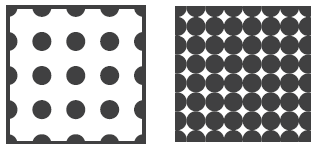
e.g. If the squares are an inch square and the dots were pixels, the image in the square on the left would be 18dpi. And the image in the square on the right would be 64dpi. The image on the right would have higher quality than the image on the left.
Bitmaps
esolution matters only for bitmap images, which are images composed of a series of dots, like photos from a camera. This is why cameras with a higher megapixel rating are more expensive—they can achieve a higher resolution and higher image quality.
Many people make the mistake of thinking resolution doesn’t change when they rescale artwork to a larger size. This is a potentially disastrous misunderstanding. Resolution is proportional to the direction you scale it. For example, if you have artwork at 50% of the final size at 300dpi, scaling it to 100% of the final size will halve the resolution to 150dpi. You’ve scaled up by 200%, and the resolution is reduced by 50%. We often ask for a high-quality vector image because we can guarantee its quality at any size.
Vector images
Vector images consist of mathematically connected points, which allows computers to scale them perfectly to any size. You should use vectors for company logos, as their uses can vary from small letterheads to large signage. Vectors also keep text razor-sharp for maximum legibility.
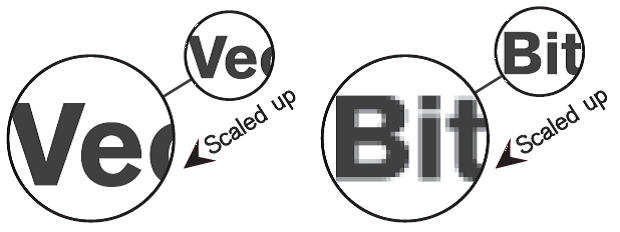
Bitmap scaling, is ‘guessed/interpreted’ by the computer. Because bitmap images only contain so many points of information (dpi). Shen you scale them up, the space between the known dots gets bigger. And the computer will try and guess/interpret dots to fill in the gaps. As can be seen, this usually results in less that sharp output.
Of course there will always be instances where bitmaps are unavoidable. But if you are ever in doubt of anything PLEASE check your art work and contact us. We will be very happy to help!
Software & Artwork Types
| Suffix | Program | Accepted? | Vetor/Bitmap | Info |
| Acrobat |  |
Mixed | PDF-X Compatible files exported from a lot of programs | |
| .ai | Illustrator | |
Vector | Vector based format that can contain images, though this is not recommended |
| .eps | Illustrator/Photoshop | |
Mixed | Hybrid format that can contain images and vectors depending on source program |
| .qxd | Quark Xpress | |
Mixed | Layout program – all support files must also be sent |
| .indd | InDesign | |
Mixed | Layout program – all support files must also be sent |
| .tif | Photoshop | |
Image | Flattened and saved with LZW compression |
| .psd | Photoshop | |
Image | Flattened |
| .jpg | Photoshop/Camera |  |
Image | Flattened and saved with Maximum Quality compression |
| .png | Photoshop |  |
Image | Mostly used for low resolution web programming |
| .gif | Photoshop | |
Image | Mostly used for low resolution web programming |
| .pub | Microsoft Publisher | |
Mixed | We are unable to open Publisher files and Exporting seems to not save all elements/effects correctly |
| .doc | Word | |
Mixed | Designed for low resolution desktop applications. Exporting seems to not save all elements/effects |
| .ppt | PowerPoint | |
Mixed | Designed for low resolution screen based images. Not recommended |
| .xls | Excel | |
Mixed | Very limited graphic capabilities. Not recommended |
| .cdr | CorelDraw | |
Mixed | No longer developed. We are unable to open CDRs |